Blog
How dv01 Eliminated Table Sprawl at Billion-Record Scale
8 May 2026
How dv01 Eliminated Table Sprawl at Billion-Record Scale
By Shayan Masood, Staff Data Engineer
How dv01's Data Platform team redesigned our BigQuery architecture to handle billions of loan records while working within hard platform limits
Introduction
At dv01, we operate a structured finance data platform that processes loan-level data across multiple asset classes—mortgages, auto loans, consumer unsecured, credit cards, student loans, and more. Every day, we ingest, validate, and serve billions of individual loan records from hundreds of financial institutions, securitizations, and loan servicers. Today, our platform processes 500+ TB of data and 140,000+ files monthly, serving 100+ institutional clients.
For years, our data architecture followed a simple model: one BigQuery table per deal. A deal can represent a securitization, platform, portfolio, or loan pool, and each has its own lifecycle of data releases. Our web application serves this data to investors and analysts, enabling multi-deal analysis and custom pool creation.
This approach worked well initially. But as we scaled to thousands of tables, the cracks began to show. Query performance degraded, metadata overhead exploded, and our operational complexity became untenable. We needed a fundamental rearchitecture that could scale to our growing data volume while respecting BigQuery's hard limits.
This is the story of Supertables: how we consolidated thousands of tables into dozens, eliminated wildcard query overhead, achieved six-figure annual savings, and built a system that will scale for the next decade.
The Problem: When Table Sprawl Becomes Untenable
The Legacy Architecture
Our original architecture was straightforward. For each asset class and table type (daily, performance, static, etc.), we created a new BigQuery dataset per release date—the maximum date users could view for a given deal in the web application. Within each dataset, every deal had its own table. Importantly, tables of the same asset class and type shared an identical schema, a detail that would later make consolidation possible.
This sharded structure originated when our loan data lived in SQL Server. As we outgrew SQL Server’s scaling limits, we migrated to BigQuery to support increasing data volumes and carried the architecture forward to enable a fast transition. It continued to perform well while data volumes remained manageable.
In practice, the structure looked like this:
daily_mortgage_2025_01_31/
  ├── deal_1
  ├── deal_2
  ├── deal_3
  └── ... (hundreds more)

daily_mortgage_2025_02_28/
  ├── deal_1
  ├── deal_2
  └── ... (hundreds more)
This design directly influenced our query patterns. The web application relied on wildcard queries to aggregate data across deal-level tables. We avoided UNIONs because they are expensive in BigQuery, requiring separate scans of each table before combining results. However, cross–release-date comparisons introduced significant query complexity:
1SELECT *
2FROM `daily_mortgage_2025_01_31*`
3WHERE _TABLE_SUFFIX IN ('deal_1', 'deal_2', ...)
4UNION ALL
5SELECT *
6FROM `daily_mortgage_2025_02_28*`
7WHERE _TABLE_SUFFIX IN ('deal_3', 'deal_4', ...)
Despite these drawbacks, the data model had several advantages:
- Simple access patterns: users could search for a deal name in the BigQuery UI
- Clear data isolation: each deal was physically separated
- Easy to understand: the structure mirrored our business logic
- Fast enough for single-deal queries with Redis caching
The Pain Points
As we scaled, this architecture began to break down:
- Wildcard Queries Don't Scale
BigQuery's wildcard queries (table_*) come with severe limitations:
- No partition pruning across matched tables
- No query result caching (every query rescans all tables)
- High metadata overhead—BigQuery must load schema info for every matched table
- Poor performance at scale (some datasets had thousands of tables)
Multi-deal queries which are common in our web application saw significantly increased latency as table counts grew. Redis caching helped for repeated single-deal queries, but couldn't mask the underlying performance issues for wildcard patterns.
- Schema Management Nightmare
Every schema change required:
- Validating thousands of individual tables
- Running ingestion and cleaning scripts against each table
- Handling client-specific custom schemas with table-level overrides
We couldn't support flexible custom field schemas without creating exponentially more tables.
- Parallel Data Pipelines
As our platform grew, different teams developed their own data pipelines to serve their specific use cases. Our enterprise data delivery team (Data Direct), for instance, had built a separate partitioned data store optimized for institutional client access patterns. This was a reasonable solution at the time because it gave them the query performance they needed without impacting the main application. However, maintaining synchronized copies meant running expensive nightly MERGE operations and paying for duplicate storage. Supertables offered an opportunity to consolidate these parallel efforts into a single, well-optimized architecture.
- PII Complexity
BigQuery wildcard queries don't support authorized views—our mechanism for PII access control. We had to maintain separate PII and non-PII table structures, doubling our operational burden.
The Solution: Supertables Architecture
Consolidation was the clear path forward, but schema differences across asset classes and table types meant we could never merge everything into a single table. We also had to work within BigQuery's hard limits. We needed a smarter approach.
Core Design Principles
- One Table Per Asset Class × Table Type
Instead of thousands of tables, we created one supertable per combination:
1daily.mortgage
2daily.auto
3daily.consumer_unsecured
4history.mortgage
5history.auto
6static.mortgage
7...
This reduced our table count from thousands to dozens.
- Integer Range Partitioning
Each supertable is partitioned by partition_id: an integer hash derived from the account name and release date. We use integer range partitioning because our natural partition key is a composite of account and release date, not a single column. Integer range partitioning lets us map this composite key to discrete buckets, giving us control over partition distribution and enabling partition-level COPY operations.
This approach enables:
- Automatic partition pruning when querying specific accounts or release dates
- Efficient filtering without full table scans
- Native BigQuery query result caching (unlike wildcard queries)
- Partition-level atomic operations (critical for our COPY strategy)
- Strategic Clustering
Tables are clustered for common access patterns, optimizing query performance for typical filtering operations.
- Controlled Access via Table Functions
To prevent accidental full-table scans, we provide table-valued functions:
1-- Instead of potentially expensive direct table access...
2SELECT * FROM supertable WHERE account_name = 'some_account'
3
4-- Users call controlled functions that require explicit account filtering...
5SELECT * FROM get_current_data(['account1', 'account2'])
This forces explicit account filtering and prevents costly mistakes.
Understanding Release Periods: Controlled Data Visibility
Before diving into the technical implementation, we need to understand a critical business requirement: controlled data releases.
In financial services, data release timing is critical. Each dataset (whether a securitization, platform, or portfolio) might have loan data at various stages:
- Current period: Data visible to end users today
- Next period: Data staged but not yet released, held under embargo
- Previous period: Historical data retained for rollback if issues are found
The "next period" concept deserves special attention. dv01 frequently receives updated loan data ahead of public disclosures such as earnings calls or regulatory filings. Releasing this data to clients before the public disclosure would constitute sharing material non-public information. To maintain compliance, we process incoming data to a separate staging location that is unavailable to our production web application until a manual release is triggered. This architecture ensures data flows continuously through our pipeline while respecting embargo requirements.
We can't simply load data and make it immediately queryable. We need controlled releases with QA approval gates and compliance checkpoints.
The Release Control Table
We maintain a table that controls data visibility across all datasets:
1-- Illustrative example of a release control table
2CREATE TABLE release_control (
3  dataset_id STRING,           -- Identifies the dataset/deal
4  previous_release_date DATE,  -- For rollback
5  current_release_date DATE,   -- Currently visible to users
6  next_release_date DATE,      -- Staged, pending QA approval
7  ...
8);
This table is the source of truth for what data should be visible to end users at any given time. When analysts QA and approve new data, they update this table to promote staged data to production visibility.
This pattern decouples data loading from data visibility, allowing continuous ingestion while maintaining strict control over what appears in our web application.
Deep Dive: Technical Challenges and Solutions
Now for the engineering challenges we had to solve to make this work.
1. Building a "Non-Clustered Index" in BigQuery
When we moved to supertables, we created a new problem: how do you efficiently query by dataset ID when tables are partitioned by account?
In OLTP databases like PostgreSQL or SQL Server, you'd create a non-clustered index. But BigQuery is an OLAP system optimized for analytical workloads, not transactional access patterns—it doesn't support secondary indexes.
Our solution: maintain our own index table.
The Partition Index Table
We created a lightweight table that tracks the mapping between datasets, accounts, and partitions:
1-- Illustrative example of a partition index table
2CREATE TABLE partition_index (
3  dataset_id STRING,      -- The logical dataset identifier
4  account_name STRING,    -- Account/tenant identifier
5  release_date DATE,      -- Data release date
6  partition_id INT64,     -- Which partition contains this data
7  category STRING         -- Asset class or data category
8)
9CLUSTER BY (dataset_id, account_name, release_date);
This is conceptually similar to a non-clustered index in an OLTP database. It's a separate data structure optimized for lookups by dataset ID, which then points back to the main table's partitions.
Every time we load data into a supertable, we atomically update this index with the new entries. This guarantees consistency: if an account exists in the partition index, it's guaranteed to exist in the corresponding supertable.
Decoupling with Materialized Views
We maintain three materialized views (current, next, previous) that filter the partition index by joining to the release control table:
1-- Illustrative example: materialized view for current release data
2CREATE MATERIALIZED VIEW partition_index_current AS
3SELECT idx.*
4FROM partition_index AS idx
5JOIN release_control AS rc
6  ON idx.dataset_id = rc.dataset_id
7WHERE idx.release_date = rc.current_release_date;
This creates a three-tier architecture where our web application queries the materialized views, which automatically filter based on release control:

This approach provides critical benefits:
Web Application Decoupling: The application queries the materialized view without knowing about the release control table. When analysts promote data by updating release control, the materialized views refresh automatically, and the application instantly sees new data—without code changes.
Instant Rollbacks: Simply update the release control table to revert to the previous period. No data movement, no re-loading, just metadata changes.
Efficient Queries: Users query by dataset ID to get account names, then use table functions to query supertables with partition pruning:
1-- Step 1: Look up accounts for the datasets we care about
2DECLARE account_names ARRAY<STRING>;
3SET account_names = (
4  SELECT ARRAY_AGG(DISTINCT account_name)
5  FROM partition_index_current
6  WHERE dataset_id IN ('dataset_1', 'dataset_2')
7);
8
9-- Step 2: Query the supertable with partition pruning
10SELECT * FROM get_data_by_accounts(account_names);
Because the partition index is small and heavily clustered, lookups are fast (typically under 100ms).
2. The Birthday Problem: Why We Needed Smart Partitioning
BigQuery has a hard limit of 10,000 partitions per table. With thousands of accounts and dozens of release dates per account, we could easily exceed this.
This is where we encountered a classic computer science problem in disguise: the birthday paradox.
The Birthday Paradox, Explained
The famous birthday paradox asks: In a room of N people, what's the probability that two people share a birthday?
Intuitively, you might think you need hundreds of people for a high collision probability (since there are 365 days). But the math shows otherwise:
- With just 23 people, there's a 50% chance of a collision
- With 70 people, it's over 99.9%
This happens because we're checking all pairs of people, not just "does this person match a specific date?" The number of pairs grows quadratically: with N people, there are N(N-1)/2 pairs to compare.
The Partition Collision Problem
Our partitioning function maps (account_name, release_date) pairs to partition IDs in a limited range:
1// Pseudocode for partition ID calculation
2
3function partitionId(accountName, releaseDate):
4    input = concat(accountName, releaseDate)
5    hash = FARM_FINGERPRINT(input)       // Fast, well-distributed hash
6    hashMod = abs(hash) % LARGE_PRIME    // Spread across hash space
7    bucket = floor(hashMod / INTERVAL)   // Map to partition bucket
8    return bucket * INTERVAL             // Snap to partition boundary
This function produces partition IDs across a range that fits within BigQuery's 10,000 partition limit while distributing accounts reasonably evenly.
With thousands of accounts, the birthday paradox tells us collisions are inevitable. Multiple accounts will hash to the same partition.
Why Collisions Matter
When multiple accounts share a partition, we face a critical constraint:
- We can't use simple COPY jobs to load data (which are free in BigQuery)
- We must use MERGE statements (which count against our DML concurrency limits)
- Load times increase (MERGE is much slower than COPY)
- Costs go up (MERGE consumes compute slots)
At scale, this matters enormously. COPY jobs are free, fast (2-5 seconds), and have unlimited concurrency. MERGE jobs are expensive, slow (30-60 seconds), and limited to 2 concurrent plus 20 queued per table.
So our goal became: minimize collisions to maximize the number of COPY jobs we can use.
Our Collision Reduction Strategy
We can't eliminate collisions entirely (birthday paradox guarantees they'll happen), but we minimize them through:
- Smart hash function: We use FARM_FINGERPRINT, Google's fast, well-distributed hash function
- Large prime modulus: We apply modulo by a large prime (1,000,000,007) before bucketing. Using a prime number here is important because when hash values have any underlying patterns or biases, a prime modulus helps break up those patterns and distribute values more uniformly across the output range. Composite numbers can interact badly with patterns in the input, causing clustering.
- Strategic cleaning: Remove old data to free up partition slots (more on this shortly)
This approach keeps collision rates manageable, allowing the majority of our loads to use fast, free COPY jobs.
3. Working Around BigQuery's DML Limits with COPY and MERGE
BigQuery has strict limits on concurrent modifications: 2 concurrent DML statements (UPDATE/DELETE/MERGE) per table, 20 additional queued statements per table, and 1,500 total table modifications per day.
During peak hours, we load dozens of deals concurrently. If we used MERGE for everything, we'd hit these limits immediately, creating a massive bottleneck.
The Hybrid Strategy: COPY When Possible, MERGE When Necessary
Our solution: dynamically choose between COPY and MERGE based on collision detection.
1// Pseudocode for hybrid COPY/MERGE strategy
2
3collisionPartitions = detectCollisions(tempTable, partitionIndex)
4
5for each partition in partitionsToLoad:
6    if partition.id in collisionPartitions:
7        // Collision detected: must use MERGE
8        executeMerge(partition)  // Counts against DML limits
9    else:
10        // No collision: use fast COPY
11        executeCopy(partition)   // Free, fast, unlimited
How Collision Detection Works
Before loading, we query the partition index to check if other accounts already exist in the target partition:
1-- Find partitions where other accounts already exist
2SELECT DISTINCT
3  incoming.partition_id,
4  incoming.account_name AS new_account,
5  existing.account_name AS existing_account
6FROM staging_table AS incoming
7JOIN partition_index AS existing
8  ON incoming.partition_id = existing.partition_id
9WHERE incoming.account_name != existing.account_name
10   OR incoming.release_date != existing.release_date;
If this query returns rows, we have a collision and must use MERGE. Otherwise, we can use COPY.
Why COPY Jobs Are Magic
Beyond being free and fast, COPY jobs support atomic partition replacement using WRITE_TRUNCATE mode.
A COPY job is essentially:
1Copy partition P from temp_table to supertable, replacing existing dataThis works perfectly when a partition contains only one account. We can safely replace the entire partition with new data.
When MERGE Is Required
When multiple accounts share a partition, we must be surgical, i.e., we can't just replace the entire partition. We use MERGE to update only the specific account being loaded:
1-- Delete-and-insert pattern for surgical partition updates
2MERGE INTO supertable AS target
3USING (
4  SELECT * FROM staging_table
5  WHERE partition_id = @partition_id
6    AND account_name = @account_name
7    AND release_date = @release_date
8) AS source
9ON FALSE  -- Force delete + insert (never match)
10WHEN NOT MATCHED BY SOURCE
11  AND target.partition_id = @partition_id
12  AND target.account_name = @account_name
13  AND target.release_date = @release_date
14THEN DELETE
15WHEN NOT MATCHED BY TARGET
16THEN INSERT ROW
17
This pattern:
- Deletes old data for this specific account/release_date
- Inserts new data for this specific account/release_date
- Leaves other accounts in the partition untouched
The Results
By using COPY when possible, we've optimized our load pipeline to avoid DML bottlenecks entirely during peak periods, while reducing compute costs significantly.

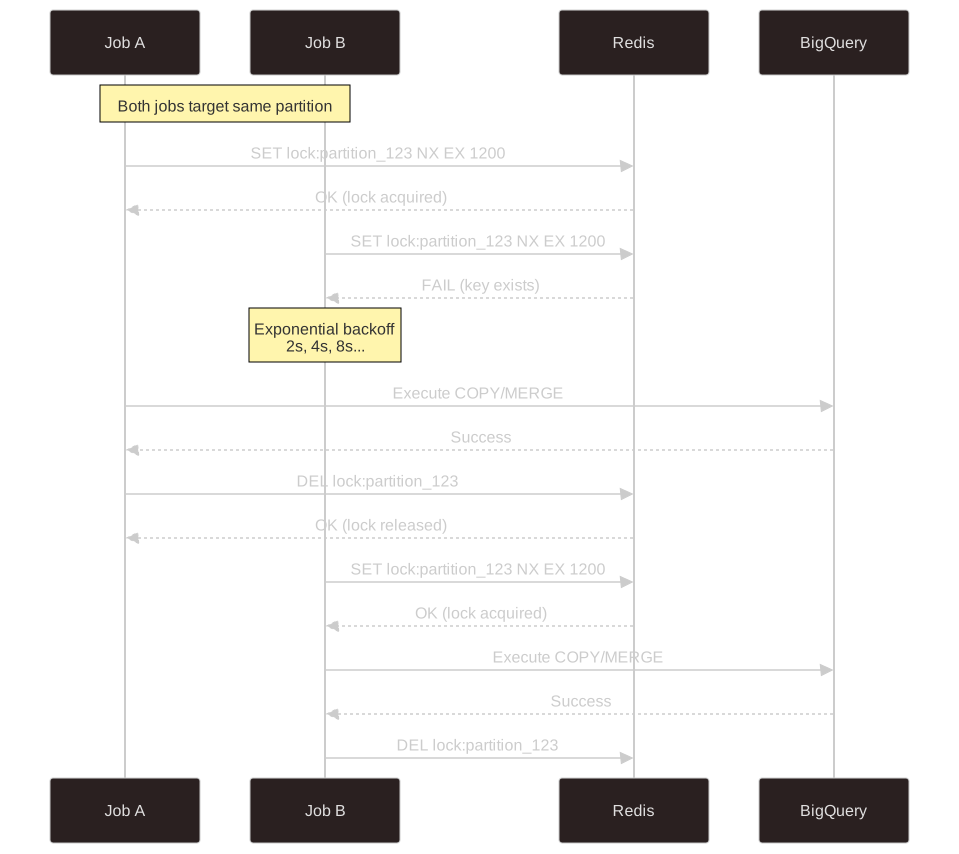
4. Redis-Based Distributed Locking
Even with our hybrid COPY/MERGE strategy, we had another problem: multiple jobs writing to the same partition concurrently.
Imagine two deals loading simultaneously, both hashing to the same partition. If they both detect "no collision" and try to COPY, the second COPY would overwrite the first account's data. Data loss.
We needed distributed coordination.
Why Not BigQuery Transactions?
BigQuery doesn't support multi-statement transactions in the traditional sense. You can't:
1BEGIN TRANSACTION;
2  -- Check if partition has collision
3  -- Load data
4COMMIT;
Each statement is independently atomic, but you can't lock resources across statements.
Redis for Distributed Locking
We use Redis (hosted on GCP Memorystore) as a distributed lock manager:
1// Pseudocode for Redis-based distributed locking
2
3function tryAcquireLock(lockKey, ttlSeconds):
4    // SET with NX (only if not exists) and EX (expiration)
5    result = redis.SET(lockKey, "locked", NX, EX=ttlSeconds)
6    return result == "OK"
7
8function releaseLock(lockKey):
9    redis.DEL(lockKey)
The key insight: SET key value NX EX ttl is an atomic operation in Redis. Only one process can successfully set a key with the NX (not exists) flag. The EX flag automatically expires the lock after a TTL, preventing deadlocks if a process crashes.
Load Workflow with Locking
1// Pseudocode for partition loading with distributed locking
2
3function loadPartition(partition):
4    lockKey = "supertable:{partition.tableId}:{partition.partitionId}"
5    ttlSeconds = 300  // 5 minutes
6
7    // Try to acquire lock
8    if not tryAcquireLock(lockKey, ttlSeconds):
9        // Another job is loading this partition
10        log("Partition locked, retrying with backoff...")
11        exponentialBackoff()  // Wait 2s, 4s, 8s, 16s, 32s
12        return loadPartition(partition)  // Retry
13
14    try:
15        // Lock acquired - safe to load
16        hasCollision = detectCollision(partition)
17        if hasCollision:
18            executeMerge(partition)
19        else:
20            executeCopy(partition)
21
22        // Update partition index
23        syncPartitionIndex(partition)
24
25    finally:
26        // Always release lock
27        releaseLock(lockKey)
Why This Works
Lock granularity: Locks are per-partition, not per-table. We can load different partitions concurrently—dozens of parallel loads across different partitions, but only one load per partition at a time.
TTL safety: If a job crashes while holding a lock, the lock auto-expires after 5 minutes. This prevents permanent deadlocks while giving ample margin for MERGE operations.
Fast: Redis SET with NX is a single atomic operation with sub-millisecond latency on GCP Memorystore.
Reliable: Redis is replicated and highly available on GCP, so lock coordination doesn't become a single point of failure.
5. The Cleaner: Automated Collision Reduction
Remember the birthday paradox? As we add more accounts and release dates, collisions are inevitable. But we can fight back by removing old data to free up partition space.
This is where automated cleaning comes in. We run a cleaner process on a regular schedule.
What the Cleaner Deletes
The cleaner removes several categories of obsolete data:
- Outdated entries: Data older than the previous release period (we only keep current, next, and previous)
- Deprecated datasets: Accounts from datasets no longer in active configuration
- Misconfigured entries: Data with invalid or sentinel dates
By continuously removing obsolete data, the cleaner reduces collisions (freeing up partition slots for new accounts), maximizes COPY job usage (more single-account partitions mean more free, fast loads), keeps tables lean, and controls costs through fewer MERGE operations.
The cleaner is triggered automatically but can also be run manually in dry-run mode to preview what would be deleted before committing changes.
6. Backwards Compatibility with Views
One of the biggest risks of a major migration is breaking downstream consumers. Our solution: convert all existing table names into views over supertables.
1-- Legacy table path becomes a view over the supertable
2CREATE VIEW `legacy_dataset.legacy_table_name` AS
3SELECT *
4FROM supertable
5WHERE account_name = 'legacy_table_name'
6  AND release_date = '2025-01-31';
This provided zero-downtime migration: existing queries continued working without modification, there's only one source of truth (the supertable), and teams could migrate to direct supertable queries on their own timeline.
Results and Impact
After months in production, the results have been substantial:
Performance Improvements
Multi-deal queries saw the biggest gains. Previously, these queries used table_* wildcard patterns that scanned hundreds of tables, couldn't leverage BigQuery's query result cache, and required loading schema information for every matched table. Now, they hit a single partitioned supertable with proper partition pruning. BigQuery's native caching kicks in on top of our existing application-level cache, and metadata overhead is gone.
For single-deal queries, performance characteristics are similar to before—we've simply moved from querying a dedicated table to filtering a partitioned supertable with efficient partition pruning and clustering.
Load performance improvements apply across the board. We can now handle dozens of concurrent loads with zero DML bottlenecks using our hybrid COPY/MERGE strategy.
Cost Savings
The migration delivered six-figure annual savings by eliminating duplicate compute slot reservations and redundant storage. Compute costs dropped significantly as the majority of loads now use free COPY jobs instead of expensive MERGE operations. Storage consolidation means we maintain a single copy of data instead of project-wide duplication.
Operational Wins
- Schema migrations are faster now that we're updating dozens of tables instead of thousands
- PII access control and Data Direct workflows are simpler with supertables as the single source of truth
- Analyst and research teams have cleaner query patterns—asset class-wide analysis that once required complex wildcard queries is now straightforward
- Backward-compatible views allowed us to achieve all of this with zero downtime
Lessons Learned
1. Respect Platform Limits, Then Design Around Them
BigQuery's limits aren't suggestions: 10,000 partitions per table, 2 concurrent DML operations per table, and 1,500 table modifications per day. We couldn't wish these away. We had to architect a system that works within them.
Key insight: use free operations (COPY) whenever possible, expensive operations (MERGE) only when necessary.
2. The Birthday Paradox Is Everywhere
Collision probability grows faster than intuition suggests. We initially underestimated how quickly partitions would collide. The math doesn't lie—run the numbers early and design for collisions from day one.
3. Build What Your Database Won't
BigQuery doesn't support secondary indexes or cross-statement transactions. We built our own: the partition index behaves like a secondary index, and Redis provides distributed locking. When your database lacks a feature, implement it in the layer above. Don't assume built-in atomicity handles all your concurrent access patterns.
4. Treat Operational Patterns as First-Class Features
Three architectural patterns were game-changing.
Automated cleaning isn't just housekeeping, it's a core performance optimization. Continuously removing old data reduces collisions, MERGE usage, and costs.
Decoupling loading from visibility through a release control table separates "data loaded" from "data visible," enabling continuous ingestion, controlled releases with QA approval, instant rollbacks via metadata changes, and clear audit trails. This pattern applies beyond finance—any time data must be staged before release.
Backward compatibility through views eliminated the coordination nightmare of updating queries across dozens of teams. By maintaining views over legacy table names, teams validated the new system while keeping existing code running—enabling fearless migration.
Conclusion
Consolidating thousands of tables into dozens of supertables was one of the most complex migrations our team has undertaken. It required deep understanding of BigQuery internals, careful collision analysis, and creative solutions to work within hard platform limits.
The architecture we built—partitioned supertables, custom indexes, distributed locking, hybrid COPY/MERGE loads, automated cleaning, and release control through metadata—delivers six-figure annual savings while maintaining full backward compatibility. Here's how it all fits together:

If you're managing large-scale data on BigQuery or any data warehouse with similar constraints, we hope our experience helps you build systems that scale.


